For about 3 weeks, I couldn’t bring myself to click Firebase’s “Upgrade to the Blaze plan (pay as you go)?” button.
I’d read too many stories about bills exploding while you sleep. The kind where Cloud Functions gets stuck in an infinite loop and you wake up to a bill in the hundreds of thousands of yen. As an indie developer, that would genuinely wreck my life.
In the end, I clicked it. I ran 3 apps for a month and then looked at the bill.
The total cost across all 3 apps was ¥22. The amount I actually paid was ¥0.
Here’s the full breakdown, and exactly how it ends up at zero.
Measured data (August 1 to August 26, 2026)
| App | Cost incurred | Offset by free tier | Amount billed |
|---|---|---|---|
| AI one-line diary | ¥6 | −¥6 | ¥0 |
| AI bedtime picture book | ¥2 | −¥2 | ¥0 |
| AI line wait-time predictor | ¥14 | −¥14 | ¥0 |
| Total | ¥22 | −¥22 | ¥0 |
All 3 are built with Flutter, with Cloud Firestore, Cloud Functions, and Firebase Authentication on the backend. One of them calls a generative AI API, and another also uses an external maps API. And that’s what it cost.
Honestly, when I saw this number I thought I’d misread the digits, and I reloaded the billing page 2 times.
“Billing starts the moment you go paid” was a misunderstanding
The reason I couldn’t press that button for 3 weeks was that I had this completely wrong.
I thought moving to the Blaze plan meant “giving up the free plan and buying a paid one.” It doesn’t.
Google Cloud processes billing in this order:
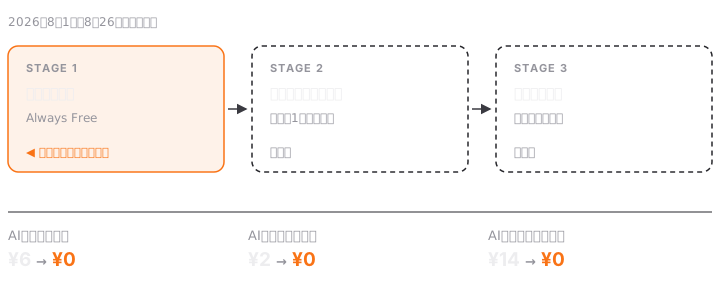
The ¥6, ¥2, and ¥14 in the table above all disappear in STAGE 1. They never even reach the credits in STAGE 2.
This isn’t a guess; you can verify it. My account had about ¥48,000 in trial credits, and the balance hadn’t gone down by a single yen. It was exactly the same as the original amount. In other words, the credits weren’t being used. The free tier alone was covering everything.
This is the key point: the free tier (Always Free) doesn’t go away when you become a paid account. Moving to the Blaze plan means “switching to a contract where you pay only for what goes beyond the free tier.” It doesn’t mean giving up the free tier itself.
By my math, reaching STAGE 3 would take hundreds of times my current traffic. Unless my usage changes, the bill stays at ¥0.
Treating my credit balance as a safety net was my biggest mistake
“I’ve got ¥48,000 in credits, so I’m fine for a while.” That was another assumption. And I had it backwards.
Credits expire. In my case, they lapse roughly 1 year after being granted. And as I wrote above, since my monthly usage fits entirely within the free tier, these credits will expire without a single yen of them ever being used.
So my credit balance wasn’t a safety net. It was effectively the same as not existing at all.
I realized this while estimating the cost of expanding nationwide. I’d built the plan on the assumption that “I have ¥48,000 in credits, so that’ll cover the initial expansion costs.” Once I checked the expiration date, that assumption fell apart completely.
The number I should have been watching wasn’t the balance; it was my actual usage against the free tier. It’s not that the balance isn’t going down. It was never on the path to being used in the first place.
Set up budget alerts anyway
After all this “it’s ¥0, nothing to fear,” I’m going to say the opposite: set up budget alerts for every app. I have them on all 3.
The reason is that costs don’t creep up gradually. They jump “one day, out of nowhere.”
You write an infinite loop and Functions keeps getting called. You widen the crawl range for an external API too far. You go unexpectedly viral and your user count jumps by an order of magnitude. Any of these can happen overnight. Finding out from the end-of-month bill is too late.
I use a low threshold of ¥1,000 a month, with 3 alert levels at 50% / 90% / 100%. In an environment that runs at ¥0, hitting ¥1,000 means something is definitely wrong. A low threshold works better than a high one.
Where I got stuck: pick the wrong “include credits” setting and you’ll detect nothing
When you create a budget alert, Google Cloud has a setting for INCLUDE credits / EXCLUDE credits. I created one without paying attention to this and got it wrong once.
- INCLUDE credits: watches the amount you actually pay, after offsets
- EXCLUDE credits: watches your “raw usage,” as if there were no free tier or credits
If you leave it at the default, it stays at ¥0 forever, so the alert will never fire. Of course it won’t, since the actual cost stays at ¥0. And even if your usage grows 10x, it stays at ¥0 as long as you’re inside the free tier, so you won’t notice that anything abnormal is happening.
Now I run 2 of them: INCLUDE to monitor actual spend, and EXCLUDE for early detection of growing usage. In an environment that keeps running at ¥0, without the second one you really can’t see anything.
Conclusion
At indie-development scale, Firebase cloud costs will almost certainly stay at ¥0. That’s not a reason to hesitate about moving to the Blaze plan. The only reason I stalled for 3 weeks was that I didn’t understand how it works.
But it’s ¥0 not “because I picked a cheap plan,” but “because I’m inside the free tier.” If you don’t understand that difference, you can’t predict what will happen the moment you scale.
What you should be watching isn’t your bill. It’s how much of the free tier you’re using up.
I build these 3 apps with a setup of “AI employees,” where AI agents are each assigned a role. I wrote about what actually happened with that setup in another post.
Next, I plan to publish the actual revenue side at the same level of detail. That one won’t be a ¥0 story.